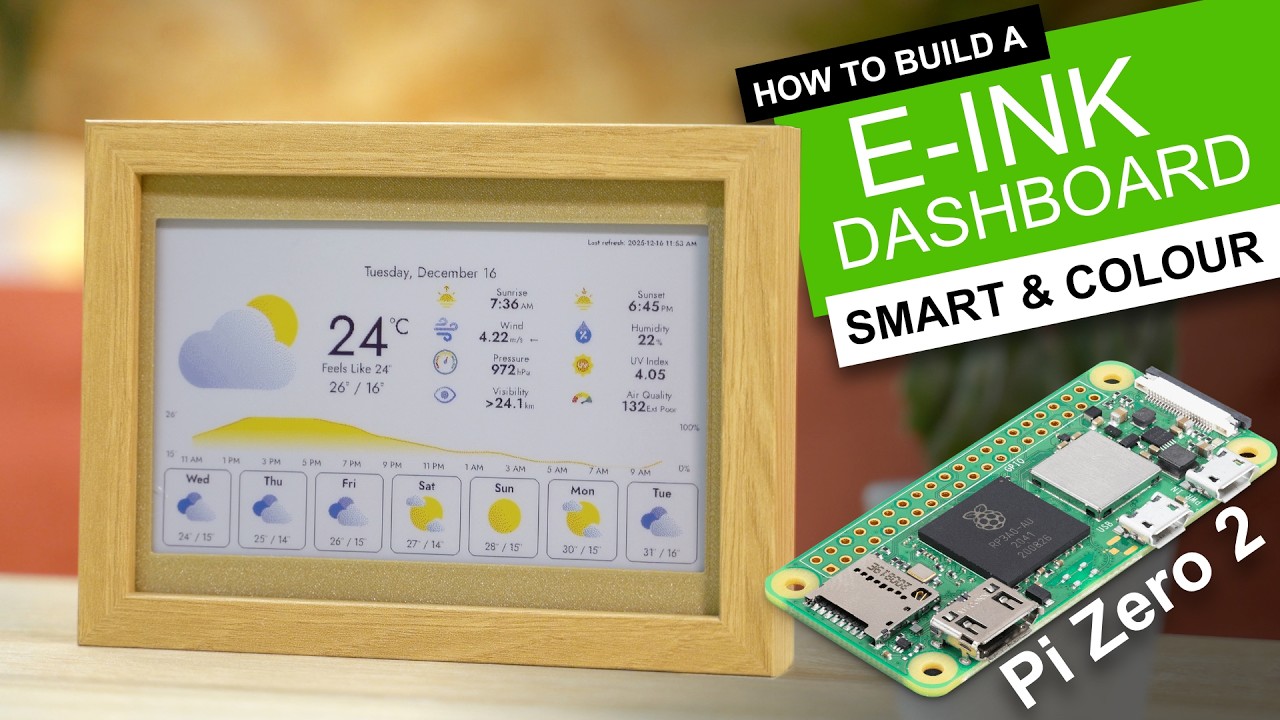
AMAZING! - DIY COLOUR SMART DASHBOARD. (How to)
Create your own smart colour e-ink paper dashboard display with Raspberry Pi Zero 2 and Waveshare.
This video is sponsored by PCBway. ? More info below ?
Get your coupons, free solder mask upgrades, and 3D printing discounts at the PCBWay Christmas sale: https://www.pcbway.com/activity/christmas2025.html
Meet InkyPi, an amazing piece of open source software which turns your colour e-ink paper display into a very versatile and dynamic digital dashboard. In this video, I'll help you create the hardware and go over the software installation.
The amazing InkyPi repo: https://github.com/fatihak/InkyPi
List of items used in this project and where to find them:
■ WaveShare 7.3" E-ink display and HAT: https://geni.us/Waveshare7-3Colour
■ Raspberry Pi Zero 2 W: https://geni.us/RaspberryPiZero-2W
■ USB Cable: https://geni.us/MicroUSBCable
■ 3D Printer Filament: https://www.3djake.uk
■ M3x6 bolts (x16) and M2.5x16mm (x4): https://geni.us/NutsAndBolts
■ 3D Printable Files: https://www.printables.com/model/1518955-build-a-colour-e-ink-dashboard-weather-calendar-ph
I use a Prusa MK4S for my projects and highly recommend both it and the Prusa Mini. If I inspired you to take up 3D printing please consider purchasing a printer via this link: https://www.prusa3d.com/product/original-prusa-mk4s-3d-printer-kit/?p2p=%40DIYMachines
Prusa support my channel when you use that link at no cost to yourself. :)
==========
3D printed parts, wiring diagrams, FAQ etc can be found here:
https://diymachines.co.uk/
Discord channel for this project: https://discord.gg/UE79EkPwAr
==========
SAY THANKS:
Provide continual and dependable support through Patreon:
https://www.patreon.com/diymachines
Or join this channel on Youtube Memberships:
https://www.youtube.com/channel/UC3jc4X-kEq-dEDYhQ8QoYnQ/join
Buy me a coffee to say thanks: https://ko-fi.com/diymachines
SUBSCRIBE:
■ https://www.youtube.com/channel/UC3jc4X-kEq-dEDYhQ8QoYnQ?sub_confirmation=1
INSTAGRAM: https://www.instagram.com/diy_machines
FACEBOOK: https://www.facebook.com/diymachines/
ETSY: https://www.etsy.com/uk/shop/DIYMachines
==========
List of camera and lighting equipment I use:
Sony A7 III: https://geni.us/Sony-Alpha7-III
Tamron 28-75mm F2.8 RXD A036SF Lens for Sony-FE : https://geni.us/TamronRXD-28-75mm
Aputure Amaran HR672C: https://geni.us/AputureAmaranHR672C
Aputure MC: https://geni.us/FAPGL
RØDE VideoMic Pro+: https://geni.us/RodeVideoMic-ProPlus
Blue Snowball iCE: https://geni.us/BlueSnowball-iCE
Philips Hue Lightstrip Plus: https://geni.us/PhilipsHue-LightStrip
Disclaimer:
This video is shared for demonstration purposes only.
This video is sponsored by PCBway. ? More info below ?
Get your coupons, free solder mask upgrades, and 3D printing discounts at the PCBWay Christmas sale: https://www.pcbway.com/activity/christmas2025.html
Meet InkyPi, an amazing piece of open source software which turns your colour e-ink paper display into a very versatile and dynamic digital dashboard. In this video, I'll help you create the hardware and go over the software installation.
The amazing InkyPi repo: https://github.com/fatihak/InkyPi
List of items used in this project and where to find them:
■ WaveShare 7.3" E-ink display and HAT: https://geni.us/Waveshare7-3Colour
■ Raspberry Pi Zero 2 W: https://geni.us/RaspberryPiZero-2W
■ USB Cable: https://geni.us/MicroUSBCable
■ 3D Printer Filament: https://www.3djake.uk
■ M3x6 bolts (x16) and M2.5x16mm (x4): https://geni.us/NutsAndBolts
■ 3D Printable Files: https://www.printables.com/model/1518955-build-a-colour-e-ink-dashboard-weather-calendar-ph
I use a Prusa MK4S for my projects and highly recommend both it and the Prusa Mini. If I inspired you to take up 3D printing please consider purchasing a printer via this link: https://www.prusa3d.com/product/original-prusa-mk4s-3d-printer-kit/?p2p=%40DIYMachines
Prusa support my channel when you use that link at no cost to yourself. :)
==========
3D printed parts, wiring diagrams, FAQ etc can be found here:
https://diymachines.co.uk/
Discord channel for this project: https://discord.gg/UE79EkPwAr
==========
SAY THANKS:
Provide continual and dependable support through Patreon:
https://www.patreon.com/diymachines
Or join this channel on Youtube Memberships:
https://www.youtube.com/channel/UC3jc4X-kEq-dEDYhQ8QoYnQ/join
Buy me a coffee to say thanks: https://ko-fi.com/diymachines
SUBSCRIBE:
■ https://www.youtube.com/channel/UC3jc4X-kEq-dEDYhQ8QoYnQ?sub_confirmation=1
INSTAGRAM: https://www.instagram.com/diy_machines
FACEBOOK: https://www.facebook.com/diymachines/
ETSY: https://www.etsy.com/uk/shop/DIYMachines
==========
List of camera and lighting equipment I use:
Sony A7 III: https://geni.us/Sony-Alpha7-III
Tamron 28-75mm F2.8 RXD A036SF Lens for Sony-FE : https://geni.us/TamronRXD-28-75mm
Aputure Amaran HR672C: https://geni.us/AputureAmaranHR672C
Aputure MC: https://geni.us/FAPGL
RØDE VideoMic Pro+: https://geni.us/RodeVideoMic-ProPlus
Blue Snowball iCE: https://geni.us/BlueSnowball-iCE
Philips Hue Lightstrip Plus: https://geni.us/PhilipsHue-LightStrip
Disclaimer:
This video is shared for demonstration purposes only.

DIY Machines
How to build awesome machines using affordable components.
Our aim is simple, to bring easy to re-create projects whilst keeping the cost low. By designing custom 3D printable components as much as possible means that if you have access to a 3D printer, ...